Blooming Tree Vector Art for Versatile Design Projects
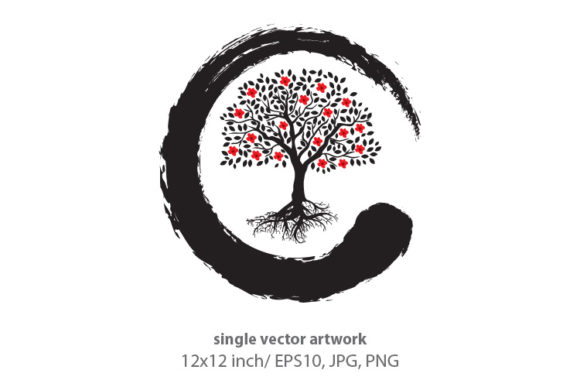
In the world of digital design, finding a graphic element that balances aesthetic appeal with technical flexibility is often a challenge. The Blooming Tree single vector artwork addresses this need by providing a high-resolution, scalable asset suitable for a wide spectrum of creative endeavors. Whether you are a freelance graphic designer building a brand identity for an eco-conscious startup, or a hobbyist crafting handmade invitations for a spring event, this specific illustration offers the foundational quality required for professional results. It is not merely a clip-art image; it is a meticulously crafted vector file created in Adobe Illustrator, ensuring that every curve of the branches and every petal remains crisp regardless of how much you resize it.
Technical Specifications and File Integrity
Understanding the technical backbone of this asset is crucial for maximizing its utility. The Blooming Tree artwork is delivered as a comprehensive ZIP file containing three distinct formats: an EPS file, a 300 DPI JPG, and a 300 DPI PNG with a transparent background. This trio covers virtually every use case a designer or creator might encounter. The EPS file is the crown jewel here. Saved as Adobe Illustrator version 10, it ensures compatibility across different versions of vector software while retaining full editability. This means you can adjust colors to match a specific Pantone palette, reshape the foliage, or isolate individual elements like the swing or specific blossoms without any loss of quality.
The inclusion of high-resolution raster files adds immediate convenience. The 300 DPI specification is the industry standard for print, ensuring that whether you are printing a small business card or a large-format poster, the image will not appear pixelated or blurry. The RGB color palette is optimized for vibrant screen display and modern digital printing processes, making the pinks of the cherry blossoms and the greens of the leaves pop with vitality. For web designers and digital marketers, the transparent PNG allows for instant layering over colored backgrounds, textures, or photographs without the tedious work of masking out a white background.
Branding and Corporate Identity Applications
For entrepreneurs and marketers, the symbolism embedded in the Blooming Tree is as valuable as its technical specs. Trees universally represent growth, stability, life, and natural balance. When integrated into a logo design, this artwork communicates these values instantly. It is particularly effective for businesses in the wellness, education, childcare, and environmental sectors. Because the artboard size is set to 12x12 inches, the composition is already balanced within a square format, which is ideal for social media avatars, app icons, and favicon designs.
Consider a pediatric clinic or a children’s educational center. The presence of the swing and the gentle, organic lines of the tree soften the corporate feel, making the brand appear approachable and nurturing. A marketing professional can utilize the vector nature of the file to create a cohesive visual language across touchpoints. You might use the full tree for the main signage, extract just the blossom cluster for a watermark on official documents, and use the silhouette for embossed stationery. This versatility reduces the need to purchase multiple assets, streamlining the branding process and ensuring visual consistency.
Creative Uses in Print and Stationery
Beyond corporate branding, this artwork shines in the realm of physical goods and paper crafts. The 12x12 inch artboard size aligns perfectly with standard scrapbooking and card-making dimensions. For creators selling on platforms like Etsy or producing bespoke stationery, the Blooming Tree serves as a centerpiece for spring and summer collections. The transparent PNG is exceptionally useful here; you can overlay the tree onto textured cardstock backgrounds or watercolor washes in Photoshop or Canva to create depth and dimension.
Invitation designers will find the thematic elements highly relevant. The keywords associated with this piece—baby, little, children, spring, love—make it a natural fit for birth announcements, baby showers, and first birthday parties. Unlike generic stock photos, the vector style allows for customization that feels personal. You could change the flower colors to match the nursery theme or adjust the swing to hold a custom text banner. For wedding stationery, the isolated floral elements can be scattered across table numbers, menu cards, and thank-you notes to create a romantic, botanical atmosphere without overwhelming the typography.
Educational and Community Engagement
Educators and community organizers often require visuals that are both engaging and appropriate for all ages. The Blooming Tree artwork is inherently child-friendly and safe for classroom environments. Teachers can use the high-resolution JPG to create vibrant posters about seasons, plant biology, or outdoor safety. Because the image is vector-based, it can be scaled up to cover an entire bulletin board or scaled down to fit on a worksheet without looking jagged.
For non-profits and community groups focused on environmental initiatives, this graphic supports storytelling. It visually reinforces concepts of sustainability and eco-friendly living. When designing flyers for a park cleanup or a tree-planting event, using a high-quality, artistic representation of nature tends to garner more engagement than standard text-heavy layouts. The emotional resonance of a blooming tree connects with viewers on a subconscious level, encouraging participation and support for the cause.
Practical Considerations for Implementation
While the Blooming Tree asset is versatile, getting the best results requires some practical know-how. First, always work with the EPS file whenever possible. Rasterizing a vector should only be done at the final output stage. If you need to resize the image significantly for a banner or a tiny icon, doing so in a vector program preserves the mathematical precision of the curves. If you are new to Adobe Illustrator, take advantage of the Version 10 save format; it strips away complex effects that might cause compatibility issues but keeps the core paths editable.
Color management is another consideration. Although the file is in RGB, if you plan to use this for offset printing or professional merchandise, you may want to convert the colors to CMYK within your design software. RGB colors are generated by light and can sometimes appear duller when converted to ink. Testing a print proof before running a large batch of stationery or apparel is always recommended to ensure the vibrant spring colors translate accurately to the physical medium.
Finally, consider the negative space. The 12x12 inch artboard provides ample breathing room around the central tree illustration. Resist the urge to crop too tightly unless necessary. That whitespace is valuable for placing headlines, contact information, or complementary design elements. When using the transparent PNG for web design, ensure you optimize the file size for faster loading times, even though the source is 300 DPI. A quick export for web at 72 DPI will maintain visual clarity on screens while keeping your site performance snappy.
Ultimately, the Blooming Tree single vector artwork is a tool designed to bridge the gap between artistic vision and practical execution. Its combination of symbolic warmth and technical rigor makes it a reliable asset for professionals and creatives alike. By understanding its file structure and leveraging its scalability, you can transform a single digital download into a multitude of polished, impactful projects that resonate with your audience.