Square Frame Border Wreath: Selecting and Using Hand-Drawn Doodle Assets Correctly
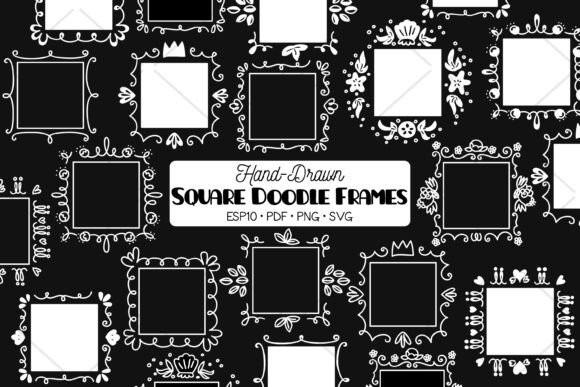
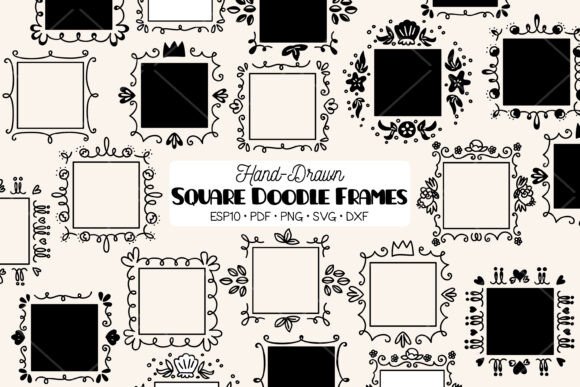
Finding the perfect decorative element for a project often feels like searching for a needle in a haystack, especially when you need something that balances whimsy with structure. A Square Frame Border Wreath offers a unique solution by combining the organic, welcoming feel of traditional circular wreaths with the practical geometry needed for modern layouts. Unlike standard round wreaths that can leave awkward empty corners on square canvases or merchandise, these hand-drawn doodle frames maximize space efficiency while maintaining a soft, artistic aesthetic. This specific collection features cute motifs including princess crowns, florals, sea shells, leaves, and other decorative illustrations, making them versatile enough for everything from nursery wall art to boutique product packaging.
However, simply purchasing a digital asset bundle does not guarantee professional results. Many creators, from hobbyists to small business owners, encounter frustration not because the designs are lacking, but because they misunderstand file formats, resolution requirements, or licensing nuances. To ensure your DIY projects—from scrapbooks and stickers to website graphics and invitations—turn out exactly as envisioned, it is essential to approach these digital clip arts with technical awareness. Understanding what you are downloading and how to manipulate it prevents wasted time, poor print quality, and unnecessary rework.
Distinguishing Between Outline, Silhouette, and Filled Styles
One of the most common oversights when working with hand-drawn doodle square frames is assuming all variations serve the same purpose. This bundle provides three distinct visual styles: 9 Black Outline, 9 Black Silhouette, and 9 Black White versions. Treating these as interchangeable is a mistake that affects both aesthetics and production efficiency.
Black Outline files are ideal for coloring pages, embroidery digitizing, or minimalist line art where negative space is crucial. If you attempt to use an outline file for a vinyl decal without understanding weeding complexity, you may find the intricate doodle lines too fragile to transfer successfully. Conversely, Black Silhouette files are solid shapes perfect for laser cutting or bold sticker designs, but they lack the internal detail necessary for adult coloring books or detailed screen printing. The Black White variations typically offer high contrast suitable for heat transfers or sublimation, yet using them on dark fabrics without a white underbase will render the design invisible.
Before starting your project, audit your intended application against the specific style provided. Do not assume you can easily convert a silhouette back into an outline; doing so often results in jagged edges and lost artistic integrity. Select the correct variation at the outset to maintain the hand-drawn charm that makes these Square Frame Border Wreath designs appealing in the first place.
Navigating Vector vs. Raster Formats for Craft Machines
The technical specifications of this bundle include 27 PNG files, 27 SVG files, 18 DXF files, 3 EPS files, and 3 PDF files. A frequent error among beginners is defaulting to PNG files for die-cutting machines simply because they are familiar image formats. While the included PNGs are high-resolution at 300 DPI with transparent backgrounds, they remain raster images. Raster images rely on pixels, meaning your cutting machine must trace the edges rather than following a precise mathematical path. This often leads to jagged cuts, misalignment, or excessive processing time.
For Cricut, Silhouette, or Brother ScanNCut users, the SVG and DXF files are your primary tools. SVG (Scalable Vector Graphics) retains layer information and clean paths, allowing for effortless resizing without quality loss. DXF (Drawing Exchange Format) serves as a universal vector format, particularly useful if your software does not support SVG natively. Using a PNG for a complex floral or leaf border wreath forces the machine to interpret pixel data, whereas the vector file tells the blade exactly where to move. Always prioritize vector formats for physical fabrication to ensure crisp, professional edges on decals, stickers, and paper crafts.
Resolution and Scalability Misconceptions
Even when using the correct file type, creators sometimes misuse assets regarding scale. While vectors (SVG, EPS, PDF) are infinitely scalable, the 27 PNG files are fixed at 300 DPI. A common pitfall occurs when a user downloads the PNG, places it in a design program, and stretches it beyond its native dimensions for a large-format print like wall art or a banner. Stretching a 300 DPI raster image reduces its effective resolution, resulting in blurry or pixelated output.
If your project requires a Square Frame Border Wreath larger than the supplied PNG dimensions, you must utilize the EPS or PDF files. These editable vector formats allow you to resize the princess crown, sea shell, or leaf elements to billboard size without degradation. Additionally, having access to editable EPS files means you can modify the design itself in Adobe Illustrator or compatible software. Perhaps you want to remove a single leaf to fit text better or adjust the curve of the frame; vectors allow this customization, whereas PNGs are static. Checking your final output size before committing to a file format saves significant reprinting costs and disappointment.
Verifying File Integrity and Organization
Digital listings deliver instant gratification, but they also require immediate verification. Upon receiving the zipped folder containing your index files and graphics, do not assume everything extracted correctly. Zip corruption, though rare, happens. Furthermore, failing to organize the 27+ files immediately can lead to version control chaos later. It is easy to accidentally use a low-res preview instead of the high-res master, or to confuse the black silhouette with the black outline when filenames are similar.
Create a structured folder system upon download: separate folders for Vectors, Rasters, and Cut Files. Rename files descriptively if the default naming convention is unclear to your workflow. Since this is a digital listing with no physical item sent, your organization is your inventory management. Also, verify that the files are indeed watermark-free as promised. Occasionally, display images get mixed into download packages by error. Confirming the cleanliness of the assets before beginning a client project or personal masterpiece avoids embarrassing watermarks appearing on finished goods.
Maximizing Versatility Across Mediums
The true value of a hand-drawn doodle square frame bundle lies in its cross-platform utility, but only if applied correctly to each medium. For web designers, the transparent background PNGs are excellent for overlaying on colored divs, but ensure you optimize the file size for web use; a 300 DPI print-ready PNG is unnecessarily heavy for a website and will slow down page load times. Convert web-use versions to 72 DPI or use optimized SVG code directly in HTML for crisp rendering on all screens.
For educators and content creators making worksheets or invitations, the PDF and EPS files offer superior text integration. Because vectors define shapes mathematically, text wraps around the floral or crown elements cleanly without pixelation artifacts. When creating merchandise for sale, such as t-shirts or mugs, remember that "hand-drawn" implies a specific texture. Over-smoothing these vectors in design software can strip away the charming, organic imperfections that define the style. Preserve the original node structure unless correction is absolutely necessary.
Ultimately, whether you are crafting scrapbook pages, designing printable wall art, or branding a small business, success depends on matching the asset's technical properties to your end goal. By respecting the differences between outlines and silhouettes, prioritizing vectors for cutting, managing resolution for print, and organizing your digital library, you transform a simple download into a reliable creative toolkit. These Square Frame Border Wreath illustrations are designed to enhance your work, provided you handle them with the care and knowledge they require.