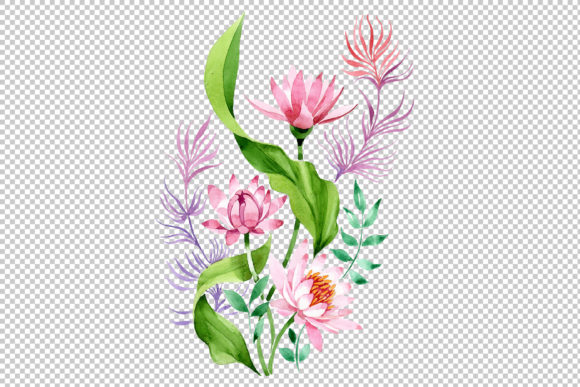
Ornament of Pink Lotus PNG Watercolor Set: A Practical Guide for Designers and Creators
When sourcing botanical assets for delicate projects like wedding invitations or spiritual wellness branding, the Ornament of Pink Lotus PNG Watercolor Set often stands out as a versatile choice. This digital collection features hand-painted aquarelle elements on a transparent background, specifically designed to bring organic softness to digital and print layouts. However, owning a high-quality asset is only half the battle. Many creators, from seasoned graphic designers to DIY enthusiasts, inadvertently compromise the final output by misunderstanding how to handle watercolor raster files. To get the most value from this set, it is essential to look beyond the aesthetic appeal and understand the technical and practical nuances of working with isolated floral PNGs.
Understanding the Asset Specifications
Before integrating these lotus illustrations into your workflow, you must verify that the file specifications align with your project goals. This particular set offers isolated PNG files at 300 DPI with dimensions of 3500x3500px. While this resolution is excellent for most applications, assuming it fits every scenario is a common oversight.
A frequent mistake occurs when users attempt to use these 3500px ornaments for large-format printing, such as event backdrops or oversized posters, without checking the physical print size. At 300 DPI, a 3500px image prints crisply at approximately 11.6 inches square. If your design requires the lotus to span 24 inches, stretching this raster file will result in pixelation and a loss of the delicate watercolor texture. Always calculate your required print dimensions before committing to the layout. If you need larger coverage, use multiple elements to create a pattern or border rather than scaling a single file beyond its native resolution.
The Transparency Trap: Managing Backgrounds Correctly
The primary advantage of this Ornament of Pink Lotus PNG Watercolor Set is the transparent background, which allows for seamless layering. Yet, transparency is often where quality degrades. Watercolor is inherently translucent; the paint bleeds and fades at the edges. When placed over dark or highly saturated backgrounds, the anti-aliased edges of the PNG can appear muddy or reveal a faint white halo if the file was not processed correctly.
To avoid this, always test your lotus ornament against your intended background color before finalizing the design. If you are designing for web or social media, ensure the background contrast supports the visibility of the pale pink hues. For print projects, remember that white ink is not standard in CMYK printing unless specified. The "white" areas of the watercolor wash will simply be the paper color. If you are printing on colored cardstock, the pink lotus may disappear or shift dramatically in tone. Use these ornaments primarily on white or cream substrates to preserve the artist’s original color intent.
Editing Limitations and Color Adjustments
Marketing materials often describe PNG sets as "fully editable," but this term requires clarification. Unlike vector graphics (SVG/EPS), you cannot adjust individual brush strokes or separate petals in a rasterized PNG. Editing is limited to global adjustments like hue/saturation, brightness, and opacity.
A significant error arises when users aggressively recolor these botanical elements to match a specific brand palette. Pushing the saturation too high on a scanned watercolor file introduces digital noise and destroys the natural paper grain texture that gives the art its charm. Instead of forcing a drastic color change, consider using blending modes in your design software. Setting the lotus layer to "Multiply" or "Overlay" allows the texture to interact naturally with your background colors, creating a cohesive look without degrading image fidelity. If an exact color match is non-negotiable, verify that the set includes PSD source files; otherwise, accept the hand-painted variation as part of the aesthetic.
Licensing and Commercial Application
For entrepreneurs and small business owners creating products for sale, overlooking licensing terms is a critical risk. Just because a file is downloadable does not mean it is cleared for commercial merchandise. Before using the Ornament of Pink Lotus PNG Watercolor Set on items intended for resale—such as greeting cards, mugs, or digital planners—you must confirm the license type.
Many watercolor sets distinguish between personal use and commercial use. Some require attribution, while others prohibit using the standalone image as the primary selling point. For example, placing the unaltered lotus on a t-shirt might violate terms, whereas incorporating it into a complex composite design for a wedding invitation suite is usually permissible. Always read the specific license agreement included with the download. Keeping a record of your purchase and license certificate protects your business from future copyright claims and ensures ethical support for the original artist.
Optimizing File Management and Workflow
High-resolution PNGs are storage-intensive. A single 3500x3500px watercolor file can range from 5MB to 15MB depending on the complexity of the paint coverage. Loading dozens of these full-size ornaments into a single document can cause software lag and increase export times significantly.
To maintain efficiency without sacrificing quality, adopt a smart asset management strategy:
- Create Smart Objects: In Photoshop or Affinity Photo, place the lotus as a Smart Object. This preserves the original resolution even if you scale it down for a mockup, allowing you to revert to full size later.
- Proxy Workflows: For initial layout drafts, use lower-resolution placeholders. Only link the full 300 DPI PNGs during the final rendering phase.
- Crop Unused Space: Watercolor scans often include excess transparent whitespace. Cropping tightly around the painted element reduces file size and makes positioning easier within your canvas.
Evaluating Quality Before Purchase
Not all watercolor PNG sets are created equal. When evaluating this or similar packs, zoom in on the preview images to inspect edge quality. Authentic hand-painted aquarelle should show irregular pigment pooling and soft gradients. If the edges look jagged, overly sharp, or uniformly faded, the file may be a low-quality scan or a digital imitation masquerading as traditional art.
Additionally, check for consistency across the set. Since each image is a separate file painted by hand, slight variations in lighting and color temperature are normal and desirable. However, if one flower looks significantly darker or more saturated than the others, they may not harmonize well when used together in a border or pattern. Requesting a sample or viewing detailed zoomed previews helps ensure the set meets your professional standards before investment.
Making the Right Choice for Your Project
The Ornament of Pink Lotus PNG Watercolor Set is a powerful resource for adding elegance and tranquility to creative works. Its utility spans from intricate wedding stationery to minimalist blog headers. By respecting the technical boundaries of raster art, managing transparency thoughtfully, and adhering to licensing protocols, you transform a simple digital file into a polished professional asset. Success lies not just in finding beautiful art, but in applying it with technical precision and mindful intention. Take the time to prepare your files correctly, and the resulting designs will reflect both the beauty of the lotus and the care of your craftsmanship.